Asus launches Windows 8 touchscreen ultrabooks and hybrids in India

0 comments
A
sus has had a busy day today, with the launch of a whole host of products as a part of its Windows 8 lineup. Among them are two touchscreen ultrabooks, and two hybrid devices that can be used as full-fledged laptops as well as tablets.


              The two ultrabooks released by Asus are the VivoBook F202E and the VivoBook S400CA. The VivoBook F202E is priced at Rs. 39,999. The specifications for this one are as follows – Intel Core i3-3217M clocking at 1.8GHz, 4GB RAM, 500GB hard drive, Intel HD 4000 graphics, an 11.6-inch touchscreen display and Windows 8 Pro preloaded on the machine. The VivoBook S400CA is priced at Rs. 59,999 and is powered by an Intel Core i7-3517M clocking at 1.9GHz with 4GB of RAM. There is a 500GB hard drive for your storage requirements and the Intel HD 4000 chip handles the graphics. In a difference to its lesser-priced sibling, this version has a 14-inch touchscreen. Windows 8 Pro is what these machines come with preloaded.

              Then came the turn of the hybrid devices. The VivoTab TF600TG features a 10.1-inch Super IPS+ display and a quad core Nvidia Tegra 3 processor powers it. There is 2GB of RAM, and a 64GB flash storage. This version comes preloaded with Windows RT. Following on from the tradition set by the Transformer and the Transformer Prime, the keyboard dock will come with and additional battery as well as a host of ports for connecting external devices. The price of the VivoTab is Rs. 61,999.

              The notebook-tablet hybrid, the Taichi. The version that has been launched is the one with the Intel Core i7-3517U processor clocking at 1.9GHz and has 4GB of RAM. The Asus Taichi has 13.3-inch dual displays, back to front, with one keyboard. You can work on either of the displays when in keyboard more, including the mirroring option to replicate the same content on both. When closed, this works as a conventional tablet. The display has both pen as well as finger touch support. This comes with a 256GB Sandisk SSD, and Windows 8 Pro is preloaded on the machine. The price of the Asus Taichi is Rs. 1,39,999 and Asus claim that this will be available in the Indian markets from December 2012.

Originally Article From Digit

Opera 12.10 Released

0 comments
I
nternet addicts are using many different web browsers to surf fast internet on the web. Opera is one of the fastest and best web browser. More than 275 million people are using Opera as their web browser for surf fast internet access. Opera supports more than 40 languages and works with Windows, Mac, Linux.

“In addition to the new extensions, Opera 12.10 now lets web developers enrich a user's web experience even more. By introducing the Context API, web developers can let the context menu (what most people call the right-click menu) get extended usability for example, start a Tweet by right-clicking a link. The Resource Loader API lets web developers have their extensions interact with advanced CSS and JavaScript on webpage,” says Opera in a release.


Opera Software has always strived to develop the fastest and technologically most advanced browsers. As a result, the Opera browser is the choice of some of the world’s most demanding and knowledgeable users. At the same time, when the powerful compression technology in the full browser is applied to the Opera Mini browser, the Web is accessible on even the simplest handsets, with small screens and limited memory. This has made the Opera Mini browser the world’s most popular mobile browser.

Now Opera released their latest version of Opera 12.10 for all the users. This latest version consist better integration for both Windows, Mac PCs.

What's new in Opera 12.10

* And Opera 12.10 adds supports for wide array of new extensions such as facebook notification, twitter notification and much more.

* This new version supports Retina display on Mac PCs.

* Fully Supports with Microsoft's new product Windows 8.

The latest version of Opera will make your web access more fast and colorful. So why you are still waiting?

Click Here to Download Opera 12.10

Create PDF from over 300 file formats

0 comments
I
posted a posts about PDF file create form other formats these post are Web Page Convert To PDF, File to PDF

Today I got something amazing create pdf from 300 file formats
PDF Converter Elite was developed with the business user in mind. Create, convert and edit any type of PDF with ease and for a fraction of a cost of Adobe Acrobat. FreePDF Creator is a fast desktop tool to create PDFs from virtually any printable Windows format.


The Free and Fast PDF Creator


FreePDF Creator Features

  • Create PDF from any printable Windows format - over 300 different file types at last count
  • Unlimited use, no time limit
  • Developed with Microsoft Office Formats in mind. Create PDF from Microsoft Word, Excel and PowerPoint easily and accurately
  • Supports Asian language fonts


System Requirements

Operating System:Windows® 98, ME®, Windows NT®, 4.0, 2000, XP®, Windows Vista®, Windows 7®
Additional Software:Microsoft Office® 2000, 2002/XP, 2003, 2007 or 2010
Processor:Pentium® processor, or equivalent
Hard Drive Space:12MB of available hard-disk space
Memory:64MB RAM
Monitor:VGA 16 color 640x480 screen resolution

Apple releases Flashback malware removal tool

0 comments
Apple releases Flashback malware removal tool
A
pple has released an automated removal tool to help users remove the flashback mal ware discovered by Dr. Web in April. It had infected an estimated half a million computers worldwide within a couple of weeks.
         The Flashback malware is a Trojan that has been designed to exploit vulnerability in java, allowing it to steal user information through the web browser and other applications, and flash it back to remote servers. It has many variants, some that mask themselves as Adobe Flash video and other browser plug-ins that users mistakenly agree to install without direct user interaction.

          Other companies released their own removal tools for the virus, starting with Kaspersky and F-Secure, and then Symantec, a little ahead of Apple- which had announced it would be developing one, two days prior to Symantec's tool release. Apple's tool will be part of a security update to Java. The fruity giant says the Flashback removal tool will get at the "the most common variants" of the malware, and also block automatic webpage Java applet execution.

          The Apple Flashback removal tool is only available for systems running OS X IO.6 or later, and will be bundled with the latest Java runtime, that also contains its own patches. The tool will install MRTAgent and a command line tool, which scour and find any Flashback malware instances, submit a log to Apple and then delete themselves. While all currently known Flashback variants should be successfully removed by the Apple tool, it will require regular updates to work effectively. Apple will also be working with internet service providers to try and disable access to the remote servers that the Trojan malware is coordinating with. Experts are predicting the time of “no malware for Mac” is at an end, with the bad guys or malware authors turning their sights to platform, deftly using their experience with the Windows and Linux malware. You can download the removal tools with Java for OS X Lion 2012-003 or Java for Mac OS X 10.6 Update 8 packages.

Using XAMPP (Apache-MySQL-PHP-Perl) for Windows

0 comments
M
any people know from their own experience that it's not easy to install an Apache web server and it gets harder if you want to add MySQL, PHP and Perl. XAMPP is an easy to install Apache distribution containing MySQL, PHP and Perl. XAMPP is really very easy to install and to use just download, extract, and start.


HOW TO INSTALL XAMPP.....

After the installation is complete, you will find XAMPP under Start | Programs | XAMPP. You can use the XAMPP Control Panel to start/stop all server and also install/uninstall services.

The XAMPP control panel for start/stop Apache, MySQL, FilaZilla & Mercury or install these server as services.
Video Tutorial

Gmail Drive

0 comments

VERDICT: A tiny utility to easily use your Gmail account as online storage.
FOR: Easy to imlement and use; data retrivable almost everywhere.
AGAINST: None.


Specifications
System Requirements
Operating system:Windows 2000 or Higher;Disk Space: 1 MB
CONTACT Viksoe.dk
PHONE NA
EMAIL NA

Ratings
Features 4/5
Performance 4/5
Ease of use 5/5
Overall Rating 4.5/5
Value for money 5/5

G
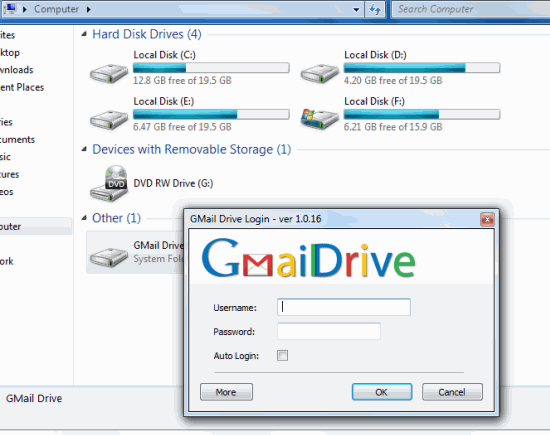
mail drive is a simple Shell Namespace Extension that creates a virtual file system around an existing Gmail account, It basically creates a virtual drive located in My computer that's linked to your Gmail account (which you have to specify). you can copy/paste or drag-n-drop files into the drive directly. Your  files are then stored in your Gmail account and you can access it from anywhere. It allows you to store a maximum of 10 GB; the storage will depend on the space you have left in your Gmail account. However, If you are using Gmail Drive with e-mail client configured with the same Gmail account and have the client configured to delete e-mails after retrieval, the Gmail Drive is flushed. We recommend you create new Gmail account to associate with Gmail Drive. This Will also benefit you with a complete 10 GB of space.

Microsoft announces cheap upgrade plans for Windows 8

0 comments

Microsoft announces cheap upgrade plans for Windows 8

M
icrosoft has announced extremely favourable prices for upgraders to Windows 8. Customers in 131 markets running Windows XP, Vista or 7 will be able to upgrade for only US $39.99 (approx Rs 2,240) and add media center for free, which is just a third of what Windows 7 was offered for when it launched. The price is applicable to digital downloads of the new operating system, which will launch on October 26 this year. Users of 32-bit operating system will be limited to a 32-bit Windows 8 installation, and the scheme will not apply to those installing a fresh OS on a blank drive. The promotional price price. The promotional price is valid till january 31, 2013. Microsoft has also greatly reduced the number of separate versions of Windows that will be available, with only standard and Pro versions available at retail. There won't be any seperate Home Premium and Ultimate editions, but a new System Builder package will serve the same purpose as cheaper OEM copies of earlies versions which circulated unofficially.

Thunderbird no longer being activity developed

0 comments
Thunderbird no longer being activity developed

T
he Mozilla Foundation has decided to cease development of its Thunderbird email client and leave future improvements to the open-source community. Starting that "on-going stability is the most important thing, and that continued innovation in Thunderbird is not a priority for Mozilla's product effects", foundation chair Mitchell Baker also announced that parts of the Thunderbird team will move on to other projects, and the main focus would shift to security and stability updates only. Originally named Phoenix, the email client has been an important and highly visible open-source project alongside Firefox. However, innovation in email handling has been limited for some times nows, and users are migrating to Web-based services or different messaging platforms entirely.

New Security Risks Detected and Patched

0 comments

OFFICE SCANNERS:-
  • Email spam with attachments masquerading as scans delivered automatically from an HP Officejet scanner i responsible fro a recent spate of trojan infection.
  • Solution:- Don't Open files from unknown sources or those recived unexpectedly. Up-to-date antivirus  software will also prevent infection.

ANDROID:-
  • Apps that claim they can magically improve the battery life of Android devices instead steal user's contacts,send them to a remote server, and harvest email address to spam.
  • Solution:- Security software can detect and neutralize the rouge app, but caution is always advised when downloading from unofficial sources.

INTERNET EXPLORER:-
  • Microsoft recently disclosed two vulnerabilities rated critical for Windows users and Moderate fro server administrators, which could  allow remote attackers to gain the same permissions as the current user.
  • Solution:- the cumulative security update 2719177 patches these holes.

MAC OS X:-
  • Malware identified as crisis or morcut is circulating in the from of a java JAR archive. The java applet itself is crossplatform and detects which OS the user is running. The payload that is  actually installed depends on which OS the user is running
  • Solution:- It is not safe to believe that Macs are safe from malware attacks. Antivirus security software is a must.

Best 10 Ways, To Create a Bootable USB flash Drive

2 comments
S
o, ever wanted to make a bootable USB Drive with your favorite Windows, Linux, or whatever bootable ISO disk?

Well, here is a large list of some software that can create a USB for you. That USB can contain a windows installation disk, a Linux CD ( could be a live version as well ), Ultimate boot CD, Antivirus Rescue CD, Recovery software live CD, Disk partitioning software and a lot more.


Create Windows Bootable USB
1. WinToFlash:

As you can see from the above screenshot, it’s the easiest software you can use to create a bootable windows. It can create a bootable version of windows xp/2003 , winPE XP/2003 , Windows vista/2008/7/8 setup to USB drive, and some more…. .


2. Windows 7 USB/DVD Download tool :

Windows 7 USB/DVD download tool is created by Microsoft itself to make it easier to create a bootable USB drive or burn windows 7 Iso file to a DVD.

3. A Bootable USB :
A Bootable USB is a little app made to let you install windows vista/2008/7  from a USB drive.

4. A Bootable USB by Askvg.com :

Seems to have the same name as the above one.But it’s got a few more options and it works for x64 versions of windows as well.

5. Setup From USB :

A simple and easy to use app to make a bootable windows vista/7 USB drive. Required .NetFramework 4.

Create PDF File in 2 simple and easy method

0 comments

Why Use PDF??
  • PDF is the official open standard ISO 32000. Being supported by International Organization for Standardization (ISO), the ISO 32000 standard will continue to be developed in the future with the purpose of protecting integrity and longevity of the PDF format – an open standard for more than 1 billion PDF files existing today.
  • PDF files look like source documents and save the data of source documents: text, pictures, video, 3D-graphics, maps, true-color images, photos and even business-charts, regardless of an application they were created in.
  • PDF files can be viewed and printed on virtually any platform: Windows, Mac, Unix, Symbian, Windows Mobile and many others.
  • Today, over 250 millions of PDF documents in Internet and countless PDF files in government departments and companies all over the world show how many organizations entrust their information to the PDF format.
  • PDF documents support auxiliary technologies ensuring the availability of information to disabled people.
  • A full-text search capability.
  • A password protection capability.

 Download PDF Creator
PDF creator is a freeware and is available at http://pdfcreator.en.softonic.com/download. You can install this software to convert your existing text or word documents into PDF.
Installation steps are quite simple. When you click on ‘Free Download’ it asks whether you want to save or run the application. You can select any of them. It then asks if you accept the agreement and start installation process .Setup has been installed, you are now supposed to run it.
Right click on the document you want to convert.
Select Create PDF and Bitmap Files with PDF Creator.
A dialog box appears informing it is necessary to set PDF creator as default printer. It is a temporary printer so no issues with it. You can easily continue.
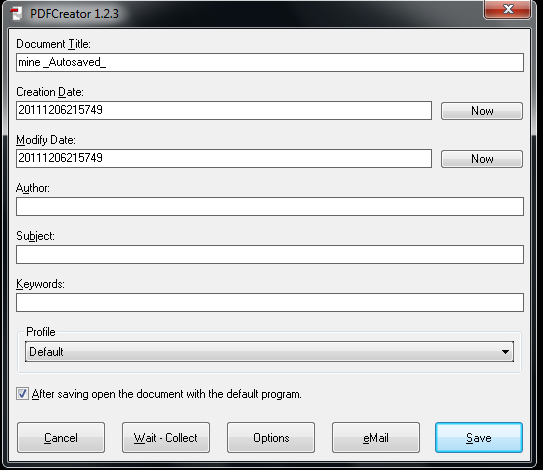
Following dialog box appears. Click Save and specify save location.


Document is now converted into PDF format. (I have converted a ’docx’ format into ‘pdf’).Even the highlighting is preserved.


Create PDF Online


If you are not interested in downloading and installing softwares … we have found a way out. You can create your pdf documents online at https://www.acrobat.com/createpdf/en/home.html

  • Click  convert PDF now.
  • It will present you its packages.
  • Subscribe to any of them.
  • It will then ask your particulars.
  • Once you are done with the sign up process, you can use it anytime. Since the prices are high, very few will go for this option so let’s move to the simplest one.

Play Foot Ball....Yupieeeeee

0 comments

CorelDRAW_Graphics_Suite_X4 Crack

0 comments
 

Google+ Followers

Total Pageviews

FeedBurner

Mayur Sojitra - Find me on Bloggers.com
Follow on Bloglovin
© 2012 A World Of Possibilities . Designed by Nitin Maheta, Powered by Blogger